Introduction
Building a great product is only half the battle. Maybe your team spent months creating a new app, a new store, or a new factory line. It looks good, it works well in the lab, and everyone is proud. But then launch day comes, and things go wrong. Phones ring nonstop, nobody knows who should answer, and a small bug turns into a big mess. The product was fine. The team just was not ready to run it.
This is the hidden secret behind many successful launches. The companies that win are not always the ones with the best product. They are often the ones that made sure their people, their steps, and their tools were all prepared before the doors opened. This preparation has a name: operational readiness.
If you want to learn more about how to prepare and run operations in a clear, simple way, you can visit Waropsx.com. In this article, I will explain what operational readiness means, why skipping it is so costly, and how you can check if your team is truly ready. I will use simple words, so even a high school student can follow along.
The High Cost of Being Unprepared
Let us start with a story that many people have seen in real life. A company launches a new online shopping feature. The ads go out, and thousands of customers rush in on the first day. But the payment system was never tested with so many people at once. It slows down, then crashes. Customers cannot pay, so they leave angry. Some post complaints online, and the news spreads quickly.
Inside the company, things are even worse. The customer support team was never told about the new feature. When people call in, the agents do not know the answers. They put customers on hold, pass them from person to person, and sometimes give wrong information. The engineers who could fix the problem are called in the middle of the night. Nobody is sure who is in charge, so people argue about what to do first.
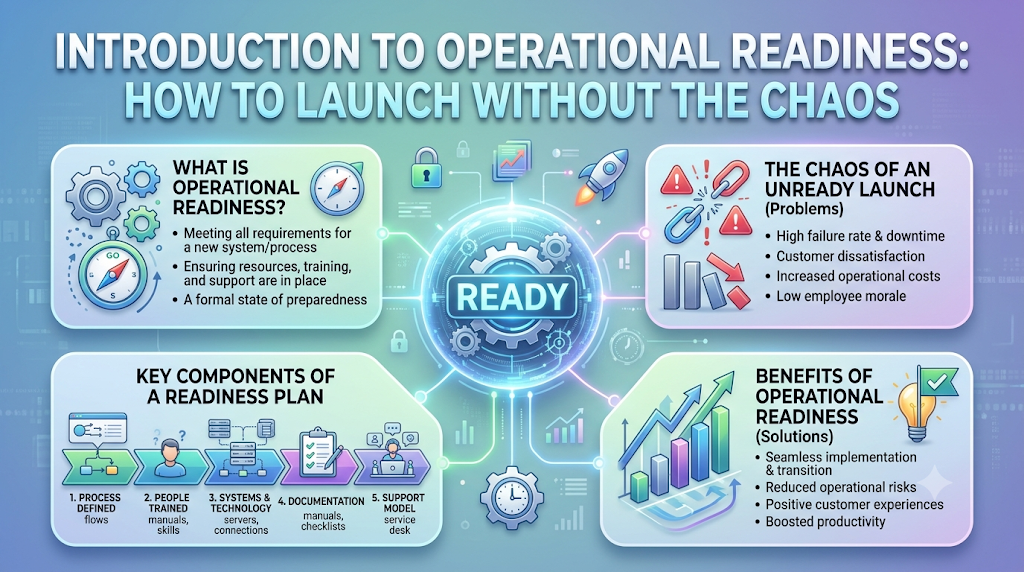
The damage adds up fast. There is lost money from the sales that did not happen. There is extra cost from emergency fixes and overtime. There is harm to the brand, since customers remember a bad first impression. And there is stress on the team. Tired, worried employees make more mistakes, which makes the problem even bigger. Some good workers may even decide to leave.
Now picture the same launch, but with proper preparation. The team tested the payment system with heavy traffic ahead of time. Support agents were trained and had a simple guide with answers. Everyone knew who to call if something broke. When a small problem showed up, the team fixed it in minutes, and most customers never noticed. The product was the same in both stories. The only difference was readiness.
What Is Operational Readiness Exactly?
Operational readiness means making sure that your people, your processes, and your technology are fully prepared before you go live with something new. “Going live” could mean launching a software system, opening a new office or factory, starting a big project, or offering a new service. The goal is simple: on day one, everything should work, and everyone should know what to do.
Think of it like getting ready for a long road trip. You would not just jump in the car and go. You would check the tires, fill the tank, pack a map, and keep a spare tire in the trunk. You would also make sure everyone in the car knows the plan. Operational readiness is the same kind of check, but for a business.
It rests on three main pillars, and all three must work together.
People: Training the Team
The first pillar is people. Even the best system is useless if the team does not know how to use it. Training means teaching each person what they need to do, when to do it, and who to ask for help. This is not only for the technical team. Customer support, sales, managers, and even security staff may all need to know something about the new launch.
Good training is practical. Instead of only reading slides, people should practice real situations. For example, support agents can role-play common customer questions. It is also important that everyone knows their role. When a problem happens, there should be no confusion about who is responsible for what.
Processes: Creating the Playbook
The second pillar is processes, which are the steps people follow to get work done. A playbook is a simple written guide that says, “If this happens, do that.” It should cover normal work, like how to handle daily tasks, and also problems, like what to do when a system goes down or a customer has a serious complaint.
A good playbook is short, clear, and easy to find. Nobody wants to read a 200-page document in the middle of a crisis. It should include contact names, simple steps, and a plan for when to ask for more help. This is also where you write down your Plan B, the backup plan if things go wrong. For instance, if the main system fails, how will you keep serving customers in the meantime?
Technology: Testing the Tools
The third pillar is technology. This means checking that all the tools, systems, and equipment work as expected. It is not enough to test that something works for one person. You need to test it under real conditions, such as many users at once, slow internet, or unexpected errors.
Testing should also include the “boring” parts, such as alerts, backups, and access rights. Can the team see when something goes wrong? Can they restore data if it is lost? Can the right people log in when needed? These small details often make the difference between a small hiccup and a big disaster.
Notice that each pillar supports the others. A trained team with no playbook will guess. A great playbook with untested tools will fail. Perfect tools with an untrained team will be misused. When all three work together, you get a smooth launch.
Comparing a Ready Team vs. an Unprepared Team
Here is a simple side-by-side look at the two kinds of teams.
| Area | Team That Practices Readiness | Team That Just “Wings It” |
|---|---|---|
| Launch day stress levels | Low, since everyone knows the plan | High, with panic and confusion |
| Customer experience | Smooth, with quick and correct help | Frustrating, with delays and wrong answers |
| Speed of fixing problems | Fast, since roles and steps are clear | Slow, since people argue and guess |
| Team confidence | High, because they practiced | Low, because they are unsure |
| Testing | Done in advance under real conditions | Skipped or done in a hurry |
| Backup plan | Written and ready to use | Missing or made up on the spot |
| Cost of mistakes | Small, because problems are caught early | Large, because problems grow before they are found |
| Reputation | Builds trust with customers | Can harm the brand quickly |
Look closely at the table. The ready team does not have fewer problems because it is lucky. It has fewer big problems because it caught the small ones early, and because it had a plan for the ones that did show up. Every launch will have surprises. Readiness does not remove them. It helps you handle them calmly.
The unprepared team often thinks that it is saving time by skipping preparation. In truth, it only moves the work to a worse moment. Instead of spending a few days on testing and training before launch, it spends weeks fixing damage after launch. And fixing things under pressure, in front of customers, is much more expensive and stressful.
This is also a matter of respect for people. When you prepare your team well, you are telling them that you care about their success. They can do their jobs with confidence instead of fear. That confidence shows up in how they treat customers, and customers notice.
How to Check If Your Team Is Actually Ready
Being ready is not a feeling. It is something you can check. Here are some practical ways to do it.
The first step is to run a dry run, also called a practice drill. This means acting out the launch before the real day, as close to real life as possible. Pretend the system is live. Let people follow the playbook, handle sample customer calls, and use the actual tools. Then watch what happens. You will almost always find gaps, like a missing instruction, a wrong phone number, or a tool that nobody can log in to. Finding these gaps in practice is a gift, because fixing them is cheap.
The second step is to use simple checklists. A checklist is a list of things that must be true before you go live. For example: Has everyone been trained? Is the playbook written and shared? Have the tools been tested with heavy use? Is the backup plan ready? Do the right people have access? Is there a named person on call for problems? A checklist may seem too simple, but it prevents important things from being forgotten when everyone is busy.
The third step is to ask the hard questions. Sit down with your team and ask, “What is the worst thing that could happen on launch day?” and “What would we do if it did?” Encourage honest answers. Ask, “What are we assuming will work that we have not tested?” These questions may feel uncomfortable, but they are where the real risks hide. It helps to invite people from different areas, since each sees a different part of the picture.
The fourth step is to decide who makes the final call. Some teams use a “go or no-go” meeting shortly before launch. Each area, such as support, technology, and operations, says whether it is ready. If anyone says no, the team looks at the reason and decides whether to fix it or delay. Having the courage to delay a launch by a few days is far better than launching a mess. Finally, plan for the days after launch, too. Keep extra people on hand, watch key numbers closely, and hold quick daily check-ins to catch and fix problems early.
Building a Culture of Always Being Ready
The best companies do not treat readiness as a one-time task. They treat it as a habit. Instead of scrambling before each launch, they keep their teams sharp all year round. This way, when something new arrives, they are already in good shape.
One part of this habit is regular practice. Just like fire drills in a school, teams can hold short practice sessions to rehearse what to do when something goes wrong. It could be a pretend outage or a pretend surge of customer calls. These drills keep skills fresh and reveal weak spots before a real problem does. Over time, people respond faster and with less fear.
Another part is learning from every event, good or bad. After a launch or a problem, smart teams hold a simple review, asking what went well, what went wrong, and what to change. The key is to keep the tone friendly and focused on fixing things, not blaming people. When people feel safe to share mistakes, the team learns quickly. When people fear blame, problems get hidden, and the same mistakes come back.
Leaders play a big role here. When leaders ask “Are we ready?” before every big step, and they give the team time and support to prepare, everyone learns that readiness matters. When leaders reward the people who spot risks early, more people speak up. And when playbooks, checklists, and training are updated regularly, they stay useful instead of collecting dust.
Over time, this turns readiness into part of the company’s identity. New employees pick up the habit from those around them. Customers feel the difference, because things simply work. And the team enjoys a calmer, more confident way of working, where surprises are handled as a normal part of the job.
FAQs
1. What is operational readiness in simple words?
Operational readiness means making sure your people, processes, and technology are fully prepared before you launch something new, so that everything runs smoothly from day one.
2. Why is operational readiness important?
It helps you avoid crashes, confusion, and angry customers on launch day. Fixing problems before launch is cheaper and less stressful than fixing them in front of customers.
3. What are the three main pillars of operational readiness?
The three pillars are people, processes, and technology. This means training the team, creating a clear playbook, and testing the tools.
4. What is a playbook?
A playbook is a short, simple guide that tells people what to do in different situations, such as normal daily work or a system failure. It should be easy to find and easy to follow.
5. What is a dry run?
A dry run is a practice version of the launch. The team acts out the real steps, using the real tools, to find gaps and fix them before the actual day.
6. What is a Plan B, and why do I need one?
A Plan B is a backup plan for when something goes wrong. It helps you keep serving customers and avoid panic if the main system or process fails.
7. Is operational readiness only for big companies?
No. Small businesses can use it too. Even a small shop opening a new service can benefit from training, simple checklists, and a backup plan.
8. How do I know if my team is ready to launch?
Check that everyone is trained, the playbook is written, the tools are tested under real conditions, and the backup plan is ready. A go or no-go meeting where each area confirms readiness also helps.
9. What should I do if my team is not ready by the launch date?
Look at what is missing and decide whether it can be fixed quickly. If not, it is usually better to delay the launch by a few days than to launch with big risks.
10. How can we stay ready all the time, not just for one launch?
Hold regular practice drills, review what went well and what went wrong after every event, keep playbooks up to date, and have leaders support a habit of preparation.
Conclusion
Operational readiness is about making sure that your people, processes, and technology are all prepared before you go live. It is the difference between a launch that runs smoothly and one that turns into a scramble. The product may be great, but without a ready team behind it, the customer experience will suffer.
The three pillars are simple to remember. Train your people, write your playbook, and test your tools. Add a Plan B for when things go wrong, and check your readiness with dry runs, checklists, and honest questions. None of this needs fancy tools. It needs time, care, and a willingness to look at what could go wrong.
Most of all, treat readiness as an ongoing habit, not a one-time task. Teams that keep practicing, learning, and improving are the ones that handle surprises with calm. So before your next big launch, pause and ask the simple question: are we truly ready? The answer could save you a lot of stress, money, and trust.