Introduction
Imagine water traveling through pipes from a clean river straight to your kitchen sink. If a pipe breaks or gets dirty, nobody gets clean drinking water.
A data pipeline works almost the same way. It moves information from apps and databases to dashboards and reports where people can use it.
When teams move this data by hand, mistakes happen and tasks slow down. This is where data pipeline automation steps in to run everything smoothly and fix problems quickly.
Learning these modern concepts is easy with educational platforms like TheDataOps.org, which helps beginners explore data practices. Let us explore how automated data systems work and why they matter.
What Is Data Pipeline Automation?
Data pipeline automation means using smart software tools to collect, clean, and deliver information without needing a person to click buttons every time.
Think of it like setting a smart alarm clock. Instead of waking up early to ring a bell, your clock plays music at the exact time you choose.
In the computing world, automated pipelines pick up raw numbers, check them for errors, transform them into neat tables, and send them to the right storage destination.
Why Automation Beats Manual Work
Doing data tasks by hand is slow and tiring. A worker might copy a spreadsheet, delete duplicate rows, and paste the results into a reporting tool.
If that person gets tired or misses a row, the entire company report becomes wrong. Automated systems follow exact rules every single minute without getting distracted.
How Data Moves in Real Life
Consider an online toy store. Every time a customer buys a wooden puzzle, a record is created.
The automated pipeline takes that order, checks if the address is valid, updates the warehouse inventory, and shows the sale on the manager’s screen in seconds.
Core Parts of an Automated Data System
Every strong data pipeline relies on several basic building blocks working together like a well-trained sports team.
- Data Sources: Where information begins, such as mobile apps, web stores, or sensor devices.
- Ingestion Layer: The front door that welcomes incoming data continuously or in scheduled batches.
- Transformation Engine: The workshop where raw records are organized, filtered, and cleaned.
- Storage Layer: The digital warehouse where clean data waits for analysts and business users.
- Data Observability: The monitoring cameras that watch the entire system to spot delays or broken connections.
Continuous Integration and Delivery for Data
Software developers use special methods called CI/CD to update computer programs safely. Data teams use these same ideas to test their pipelines before sharing new data.
Whenever an engineer writes a new rule to calculate sales tax, automated tests run first. If the test passes, the pipeline updates automatically without interrupting daily reports.
Keeping Data Clean with Quality Checks
Garbage inside leads to garbage outside. If a customer writes letters in a phone number field, bad data enters the system.
Automated checks stop these bad records at the entrance. The system flags the strange record, alerts the team, and lets good records pass through without stopping the entire line.
Understanding Key Differences in Modern Data Systems
Understanding how automation changes daily work helps teams choose the right tools and strategies.
| Feature | Manual Data Pipelines | Automated Data Pipelines |
| Execution Trigger | Human clicks or manual scripts | Event triggers or automated schedules |
| Error Detection | Found late by business users | Caught immediately by automated monitoring |
| Delivery Speed | Hours or several days | Real-time or a few minutes |
| Team Effort | Repetitive daily maintenance | Designing new features and improvements |
| Data Reliability | High risk of human mistakes | Consistent rules and steady quality checks |
Practical Tools Used in Data Operations
Engineers use specialized software to keep data moving smoothly across cloud networks.
Raw Data Sources ➔ Ingestion & Scheduling ➔ Processing Engine ➔ Monitoring & Dashboards
Orchestration and Scheduling
Orchestration tools act like musical conductors. They tell each software program when to start and when to finish.
Apache Airflow is a popular tool for this job. It creates clear schedules so task B never begins until task A finishes successfully.
Processing Big Information
When companies collect millions of numbers every minute, standard computers cannot handle the load. Frameworks like Apache Spark divide the work among many computers working at once.
This distributed power ensures that complex math finishes in seconds rather than days.
Tracking and Monitoring
Teams cannot fix problems they cannot see. Observability tools like Grafana display visual dashboards showing pipeline health.
If a data flow slows down or stops, alerts go out immediately so engineers fix it before business decisions suffer.
Practical Steps to Build an Automated Pipeline
Creating your first automated pipeline is straightforward when you follow a structured sequence.
- Define the Goal: Decide what information you need and where it must go.
- Connect the Sources: Build secure links to the databases or applications holding the raw numbers.
- Set Quality Rules: Write clear tests to check for missing names, negative prices, or duplicate entries.
- Schedule the Workflow: Use an orchestration tool to decide whether data moves hourly, daily, or instantly.
- Add Alert Systems: Configure automatic notifications that ping your team if a connection fails.
Common Challenges and How to Solve Them
Building automated pipelines comes with real-world hurdles that require smart planning.
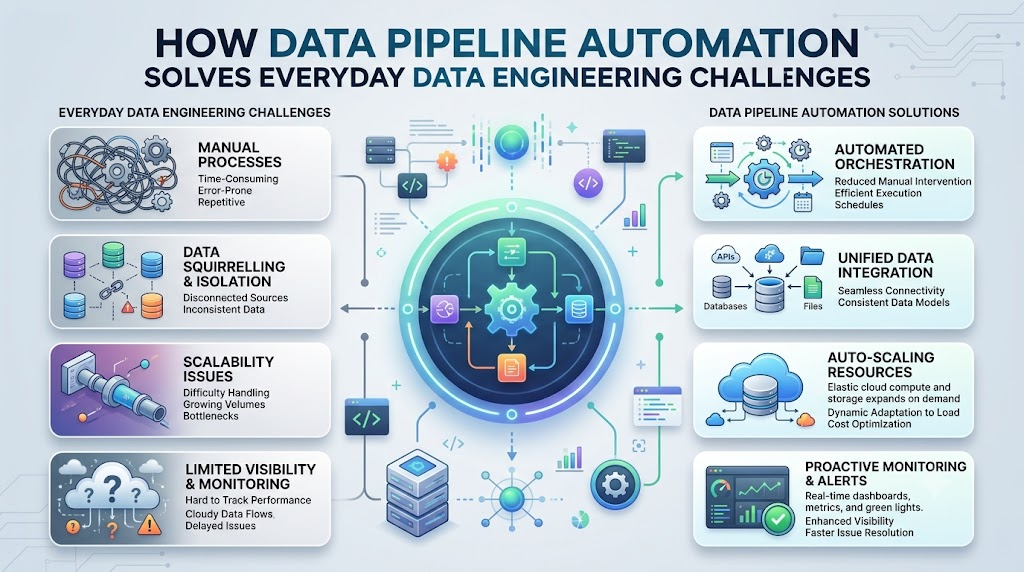
- Sudden Schema Changes: An application might change a field name from “phone” to “mobile_number,” which can break older rules. Using flexible data contracts prevents sudden pipeline crashes.
- Data Volume Spikes: Holiday shopping can double website traffic instantly. Cloud platforms solve this by automatically adding more computing power during busy hours.
- Siloed Teams: Sometimes data engineers and business analysts do not speak the same language. Practicing DataOps brings everyone together to share common goals.
Skills Needed for a DataOps Career
Because data operations keep modern businesses running, skilled professionals are in high demand across many industries.
A successful DataOps Engineer understands both data engineering and operational habits. They know how to write clean Python code, build pipelines, manage cloud resources, and configure automated tests.
Many people start by taking a structured DataOps Course to understand foundational workflows. Others pursue a DataOps Certification to demonstrate their skills in data pipeline automation and continuous delivery.
For organizations needing specialized guidance, professional DataOps Consulting helps modern teams modernize older infrastructure into reliable, automated platforms.
Learning these skills opens doors to exciting career paths where technology solves real everyday problems.
Frequently Asked Questions
What is data pipeline automation in simple terms?
It is a way to move and clean digital information automatically using software programs, so humans do not have to perform manual copying and pasting every day.
How does automation improve data quality management?
Automated systems run instant validation tests on incoming records. They catch missing information, spelling mistakes, or incorrect numbers immediately before bad data reaches reporting dashboards.
What is the difference between DevOps and DataOps?
DevOps focuses on building and releasing reliable software applications quickly. DataOps takes those same helpful automation ideas and applies them specifically to data pipelines, data quality, and analytical models.
Can beginners learn data pipeline automation easily?
Yes, beginners can start by learning basic Python scripts, simple SQL queries, and fundamental workflow concepts through educational platforms like TheDataOps.org before moving on to complex cloud tools.
Final Thoughts
Data pipeline automation changes the way companies handle digital information. By removing slow, manual tasks, organizations deliver accurate data faster while preventing costly errors. From smart scheduling and quality testing to real-time observability, automated pipelines turn messy raw numbers into useful answers. Whether you are a student exploring technology or an IT professional upgrading your technical skills, learning data operations opens exciting opportunities. Educational hubs like TheDataOps.org provide clear pathways to master these essential modern practices. Automating your data workflows creates dependable systems that help everyone make better, smarter decisions every day.