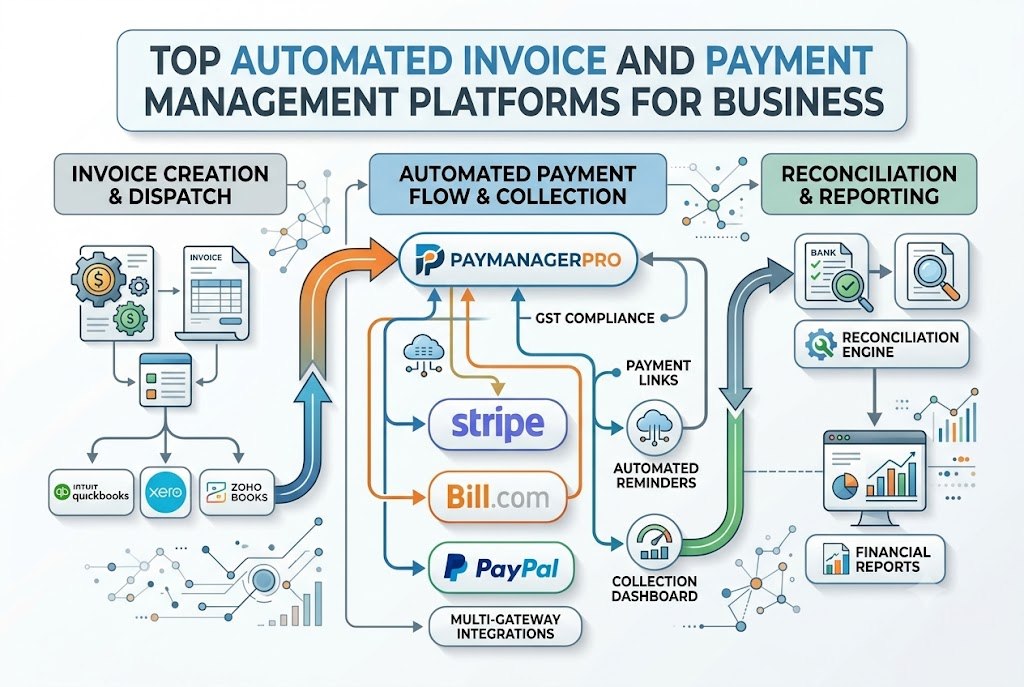
Manual receivables management creates severe financial friction for growing businesses. When accounting teams manually craft tax invoices, send scattered reminders, and track bank settlements across multiple payment portals, cash flow slows down drastically. Mistakes occur, customer relationships suffer, and audit trails break. To eliminate these bottlenecks, mid-sized enterprises and fast-growing startups are migrating toward integrated invoice and payment management software. Unifying billing, collections, payment link generation, and automated reconciliation into a single system allows finance teams to regain control over their balance sheet. This comprehensive guide covers everything modern finance leaders need to know: from navigating complex GST compliance and automating payment collections to standardizing accounts receivable workflows and scaling enterprise-wide operations.
What is Invoice and Payment Management Software?
Invoice and payment management software is a centralized digital solution engineered to automate the complete billing-to-settlement lifecycle. Instead of treating invoicing and payment collection as separate administrative tasks, this platform connects them into a smooth operational flow.
Invoice Creation ➔ Payment Link Generation ➔ Customer Collection ➔ Settlement ➔ Auto-Reconciliation ➔ Financial Reporting
The core components include:
- Digital Invoicing Engine: Generates tax-compliant invoices instantaneously.
- Unified Payment Gateway Hub: Accepts payments via credit cards, net banking, UPI, and digital wallets.
- Reconciliation Module: Automatically matches bank statements with open receivables.
- Audit & Reporting Layer: Tracks transaction history, tax obligations, and collection metrics.
By centralizing these functions, organizations replace disjointed spreadsheet tracking with real-time financial control.
Why Modern Businesses Need Automated Payment Management
Manual payment processing slows down revenue growth and consumes valuable employee bandwidth. Modern businesses adopt automated payment management solutions to solve four key operational challenges:
- Accelerated Cash Flow: Automated reminders and embedded payment links significantly reduce Days Sales Outstanding (DSO).
- Complete Payment Visibility: Real-time dashboards provide immediate insight into paid, pending, and overdue accounts.
- Drastic Error Reduction: Eliminating manual data entry prevents double-billing, incorrect GST calculations, and unallocated customer payments.
- Superior Customer Experience: Clients receive professional invoices with instant payment options via email or messaging platforms.
Relying on outdated tracking methods increases operational risk. Automation provides the infrastructure required to scale payments safely.
Key Features of PayManagerPro
PayManagerPro provides an enterprise-grade platform that streamlines end-to-end payment management.
- GST Invoicing: Automatically calculate CGST, SGST, and IGST based on customer jurisdiction while maintaining strictly sequential invoice numbering.
- Payment Links: Generate custom payment links with flexible expiry options and support for partial payments.
- Collection Dashboard: Monitor total revenue, pending receivables, and gateway settlements from a single command center.
- Multi-Gateway Integrations: Unify collection processing across various payment gateways.
- Advanced Reconciliation Engine: Automatically match incoming payouts against specific invoice ledger accounts.
- Developer-Friendly APIs: Connect existing ERPs, CRMs, and custom software directly through open rest APIs.
- Approval Workflows: Maintain governance with flexible maker-checker permissions.
- Complete Audit Logs: Track every invoice status change, payment attempt, and user modification for regulatory compliance.
For detailed plan specifications, visit our Pricing page or read more About Us.
GST Invoice Software in India
Navigating tax rules in India demands precision. Businesses must issue GST-compliant documents that comply with strict tax frameworks established by the GST Council.
Understanding GST Tax Components
- CGST & SGST: Applied to intra-state transactions where the buyer and seller reside in the same state.
- IGST: Applied to inter-state transactions where goods or services cross state boundaries.
Compliance & Reporting Requirements
Enterprise invoicing software must enforce sequential document numbering, record valid Goods and Services Tax Identification Numbers (GSTIN), and format line items correctly according to HSN and SAC classification codes. Automated tax calculation prevents penalty risks during filing periods and aligns with directives from the Income Tax Department.
Payment Link Management
Chasing unpaid invoices via traditional bank transfers delays collections. Integrated payment link management transforms static billing documents into dynamic digital payment channels.
Invoice Created ➔ Payment Link Generated ➔ Shared via WhatsApp/Email ➔ Instant Customer Payment
- Instant Link Generation: Create unique payment links tied directly to individual invoice amounts.
- Multi-Channel Distribution: Share links instantly using automated email schedules or direct messaging via WhatsApp.
- Partial Payments & Flexible Terms: Allow customers to pay milestones or structured installments without creating new invoices manually.
- Custom Link Expiry: Set security time windows on links to maintain dynamic pricing integrity.
Learn more about these collection mechanics on our Payment Links feature hub.
Automated Payment Collection
Modern buyers expect flexible payment channels. Supporting diverse payment methods ensures faster collection turnarounds. The platform leverages standard collection protocols governed by the Reserve Bank of India and the National Payments Corporation of India.
Supported payment modalities include:
- Unified Payments Interface (UPI): Enables instant, low-cost mobile collections.
- Credit and Debit Cards: Accepts major international and domestic card networks.
- Net Banking: Supports direct account transfers across major commercial banks.
- Digital Wallets: Provides quick checkout options for consumer-facing services.
Consolidating these channels into a unified portal ensures all incoming payments map cleanly to open accounts receivable balance sheets. Explore details on our Invoice Management module.
Invoice Payment Tracking
Without real-time payment tracking, finance managers struggle to forecast working capital needs accurately.
- Outstanding Invoices Overview: Instantly view active balance amounts organized by client profile.
- Collection Ageing Analytics: Categorize unpaid accounts into clear time buckets (e.g., 0-30 days, 31-60 days, 60+ days) to pinpoint aging receivables.
- Automated Overdue Follow-ups: Trigger smart reminder sequences before and after payment due dates.
Automated tracking removes manual follow-up burdens from account managers, ensuring consistent collections without damaging client relationships. Review real-time tracking metrics on our customizable Dashboard.
Automated Payment Reconciliation
Manual payment reconciliation is one of the most time-consuming administrative tasks in finance. Accounting teams must balance payment gateway settlement reports, bank statements, and open invoice registries.
Gateway Settlement File ➔ Automated Matching Engine ➔ Ledger Update ➔ Exception Flagging
Automated payment reconciliation uses rules-based algorithms to compare transaction identifiers, payout batch numbers, and exact line-item amounts across platforms. When discrepancies occur—such as short payments or gateway deductions—the system flags them for immediate operational review.
Automating this process provides transparent audit trails while upholding recognized Accounting Standards. Discover more on our dedicated Reconciliation page.
Accounts Receivable Automation
Accounts receivable automation transforms traditional billing departments into strategic financial operations.
Invoice Generation ➔ Automated Distribution ➔ Scheduled Reminders ➔ Instant Payment ➔ Ledger Settlement
By digitizing every phase of the receivables life cycle, organizations lower operational costs, eliminate data entry errors, and gain full visibility into working capital performance. Check out our comprehensive Reports feature to analyze cash flow analytics.
Invoice-to-Cash Automation
The invoice-to-cash process covers every touchpoint involved in converting delivered goods or services into confirmed cash reserves.
Step 1: Invoice Generation
  │
Step 2: Payment Link Creation
  │
Step 3: Customer Digital Collection
  │
Step 4: Bank Settlement Processing
  │
Step 5: Automated Ledger Reconciliation
  │
Step 6: Financial Report Updating
Automating this lifecycle removes human delay at every stage. For technical details on integrating your existing tech stack into this pipeline, check our developer API documentation.
Enterprise Payment Management
Enterprise payment environments require robust security and organizational flexibility. Managing multiple business branches or international subsidiaries on isolated software tools creates operational blind spots.
Key enterprise features include:
- Multi-Branch Hierarchy: Consolidate multiple operational business units into a unified master account.
- Maker-Checker Workflows: Mandate double-authorization for refund approvals, invoice adjustments, or vendor payouts.
- Granular User Roles: Restrict access using role-based permissions designed specifically for accountants, compliance officers, and executive leaders.
Review our client resources and setup guides on the Help Center.
Security & Compliance
Financial data requires enterprise-grade protection and strict compliance safeguards.
- Data Encryption: Protect sensitive financial data both in transit and at rest using modern cryptographic standards.
- Comprehensive Audit Logs: Record every system event, user login, invoice revision, and payment attempt for full operational accountability.
- Regulatory Compliance: Maintain full compliance with corporate data standards outlined by the Ministry of Corporate Affairs.
Integration Capabilities
Modern SaaS ecosystems rely on open, interoperable systems. Automated payment solutions connect seamlessly with your existing technology stack, including top Indian payment gateways like Razorpay, Cashfree, and Paytm, as well as leading ERPs, CRMs, and accounting platforms.
[ CRM Systems ] ──┐
[ ERP Engines ]  ├──> [ Payment Management Platform ] ──> [ Payment Gateways ]
[ Accounting  ] ──┘
This interoperability eliminates manual CSV exports and keeps your core accounting records up to date automatically.
Industries That Can Use PayManagerPro
- Manufacturing: Manage large-scale distributor billing, track partial payments, and calculate complex GST structures seamlessly.
- Healthcare: Streamline patient billing, process insurance co-pays, and automate collection reporting across multiple hospital locations.
- Education: Automate recurring tuition collection, issue instant digital tax receipts, and track fee balances centrally.
- Logistics: Generate dynamic transport invoices, track delivery payments, and simplify vendor payout reconciliations.
- Retail & E-commerce: Manage high-volume consumer payments, process instant online returns, and reconcile gateway settlement files automatically.
- SaaS & Technology: Handle recurring subscription billing, track customer accounts, and simplify global software invoicing.
- Marketing Agencies: Issue milestone-based billing, collect retainer payments via shareable links, and monitor overdue accounts easily.
- Financial Services: Standardize customer loan collections, track late payment fees, and verify transactional audit records.
- Professional Services: Bill consultancy hours cleanly, issue tax-compliant retainer invoices, and reduce DSO across accounts.
Manual Process vs. PayManagerPro
| Operational Metric | Manual Invoicing Process | PayManagerPro Automation |
| Invoice Creation | Manual entry in spreadsheets; slow and error-prone | Automated generation; 100% tax compliant |
| Collections | Reliance on offline bank transfers and manual follow-ups | Integrated payment links sent via WhatsApp/Email |
| Reconciliation | Manual CSV matching across bank lines; takes days | Automated transaction matching in real time |
| Reporting | Static, outdated end-of-month financial reports | Dynamic real-time executive dashboard |
| Error Rate | High risk of duplicate billing and tax miscalculations | Zero mathematical or tax rule errors |
| Time Spent | 15–20 hours weekly on routine admin work | Under 2 hours weekly spent reviewing exceptions |
Business Benefits
Switching to an automated payment management workflow provides immediate operational advantages:
- Accelerated Cash Collections: Lower DSO by offering customers effortless digital payment options.
- Lower Operating Costs: Reduce manual administrative overhead and free up accounting staff for strategic tasks.
- Enhanced Financial Accuracy: Eliminate human input errors across tax calculations and ledger postings.
- Improved Client Relationships: Deliver clean, professional, and accessible billing experiences.
Best Practices for Invoice and Payment Management
- Establish Clear Payment Terms: Explicitly state due dates, late payment charges, and available payment methods on every invoice.
- Automate Reminders Early: Schedule automated payment notifications 3 to 5 days before invoice due dates.
- Offer Diverse Payment Channels: Give clients access to UPI, credit cards, net banking, and direct digital options.
- Reconcile Daily: Run daily automated reconciliation checks to keep ledger balances accurate and spot discrepancies early.
Common Mistakes to Avoid
- Relying on Manual Spreadsheet Tracking: Spreadsheet tracking leads to version confusion, data loss, and untracked accounts receivable.
- Inconsistent Payment Follow-Ups: Inconsistent communication signals that late payments are acceptable, directly increasing your DSO.
- Incorrect Tax Formatting: Missing HSN codes or wrong GST calculations can stall client processing and lead to compliance fines.
- Delaying Bank Reconciliation: Waiting until month-end to reconcile transactions makes resolving missing or mismatched payments difficult.
Future of Digital Payment Management
The digital payment ecosystem continues to evolve rapidly. Modern platforms are adopting AI-driven reconciliation models to predict late-payment risks before invoices mature. Embedded finance framework development allows companies to offer dynamic credit terms at checkout, while API-first architectures ensure instant communication between enterprise resource planning systems and core banking networks. Investing in robust payment infrastructure keeps your business scalable, agile, and audit-ready.
Frequently Asked Questions
What is invoice and payment management software?
Invoice and payment management software is a specialized platform that automates invoice creation, simplifies digital payment collections, and handles bank reconciliation. It replaces manual spreadsheet tracking with a unified system that connects your billing workflows directly to digital payment gateways. This reduces administrative overhead, eliminates manual data entry errors, and helps businesses collect outstanding receivables faster.
How does automated payment reconciliation work?
Automated payment reconciliation uses smart matching algorithms to compare incoming payment gateway payouts against open accounts receivable invoices. The system matches unique transaction IDs, customer numbers, and ledger amounts automatically. When settlements align perfectly, the software updates your accounting ledger instantly; any mismatches are flagged for review.
Is PayManagerPro compliant with GST regulations in India?
Yes. PayManagerPro fully supports Indian GST billing requirements. The software calculates CGST, SGST, and IGST accurately based on state jurisdictions, enforces strictly sequential invoice numbering, and supports mandatory HSN/SAC code tracking. This simplifies monthly tax filings and ensures full compliance with guidelines issued by the GST Council.
Can I share payment links via WhatsApp and Email?
Yes. The platform lets you generate unique payment links tied directly to specific invoices. You can distribute these links instantly through automated email templates or direct WhatsApp messaging. Clients simply click the link to complete their payment via UPI, credit card, or net banking, accelerating overall collection speeds.
How does accounts receivable automation improve cash flow?
Accounts receivable automation speeds up your entire cash collection cycle. By sending automated invoices immediately, triggering pre-scheduled payment reminders, and providing one-click digital payment methods, businesses remove common payment friction points. This directly lowers Days Sales Outstanding (DSO) and ensures a healthier, more predictable cash flow.
What payment methods can my customers use?
Customers can pay using a wide range of secure digital options, including UPI apps (such as Google Pay, PhonePe, and Paytm), major credit and debit card networks, net banking across major commercial banks, and popular digital wallets. Offering these flexible choices helps clients pay on time using their preferred payment method.
Can PayManagerPro integrate with my existing ERP or accounting software?
Yes. PayManagerPro features open, developer-friendly REST APIs that integrate smoothly with popular accounting tools, custom ERP systems, and CRM platforms. This connectivity ensures that customer updates, invoice records, and payment settlements sync across all your corporate databases without requiring manual file exports.
What is a maker-checker approval workflow?
A maker-checker workflow is an internal control framework where one user creates or modifies an operational document (the “maker”) and a second user reviews and approves it (the “checker”). This dual-authorization step prevents unauthorized invoice adjustments, unapproved refund issuances, and user errors across enterprise accounting environments.
How does the platform handle partial payments?
The system allows you to enable or disable partial payments on an invoice-by-invoice basis. When partial payments are permitted, customers can pay in designated installments or milestone amounts. The platform tracks the remaining unpaid balance automatically, updates the open ledger status, and issues updated reminders for the outstanding amount.
What security measures protect my business’s financial data?
PayManagerPro uses enterprise-grade encryption standards for all stored data and active platform communications. The software features granular role-based access controls, comprehensive user audit logs, and secure payment processing layers that comply with relevant regulatory standards set by the Reserve Bank of India and corporate governing bodies.
How does payment management software help multi-branch enterprise businesses?
Multi-branch payment management software centralizes financial visibility while preserving local operational flexibility. Executive leaders can track total collections across all business units from a single dashboard, while branch managers access only their assigned regional accounts through role-based access permissions.
What is the difference between a static invoice and an automated payment link?
A static invoice is simply a document (like a PDF) detailing purchased items and bank details, requiring the buyer to manually initiate a transfer. An automated payment link is an interactive digital channel connected directly to that invoice, allowing the buyer to click and pay instantly via UPI, cards, or net banking with auto-filled balance details.
Conclusion
Managing modern business finance demands speed, clarity, and structural precision. Continuing to rely on manual spreadsheet updates, offline bank reconciliation, and scattered follow-up messages creates cash flow bottlenecks and increases human error. Deploying an integrated enterprise invoice and payment management software solution enables organizations to automate receivables from invoice creation to ledger settlement.