Introduction
Dinner service starts with a rush of hungry guests. Phone lines ring constantly while hosts juggle waiting lists. Empty tables cost money, but double bookings cause chaos. Keeping guests happy takes speed, focus, and smart tools. Modern restaurants need reliable ways to track every seat.
Platforms like DineGlobe help hospitality teams connect online bookings directly with front-of-house table control. DineGlobe lets staff manage the dining room without stress. Smooth shifts begin with clear systems that keep everyone organized from opening to close.
Why Modern Dining Rooms Need Digital Reservation Systems
Traditional paper logbooks slow down busy restaurant teams. Pages get messy, erasing mistakes leaves marks, and phone reservations take too much time. Digital tools take online bookings day and night.
Your staff can focus entirely on greeting guests and delivering great food. Reservation platforms eliminate accidental double bookings completely. They also help organize table turns so you seat more covers each night.
Restaurant Reservation Software acts as the digital heartbeat of your dining room. It keeps front-of-house staff, servers, and managers on the same page.
Direct Bookings vs Third-Party Dining Marketplaces
Owning your guest data protects your restaurant brand. Third-party apps often charge heavy fees for every single cover. Direct booking systems let you keep your profits and build real customer loyalty.
| Booking Channel | Guest Data Ownership | Per-Cover Commission Fees | Brand Experience | Operational Control |
| Direct Restaurant Booking Page | High (Full access to guest history) | Zero or low flat setup cost | 100% Branded to your venue | Complete control over rules |
| Third-Party Marketplace App | Low (Shared or restricted data) | High per-cover commissions | Shared across competitor lists | Limited control over seating |
| Traditional Phone Bookings | Manual records only | Zero fees, high staff time | Personal human touch | High risk of human error |
| Walk-In Only Operations | None collected | Zero fees | Direct and spontaneous | Dependent on queue flow |
Custom booking links on your website invite diners directly. Guests reserve tables in seconds without seeing competitor ads. You collect valuable email addresses and dietary notes easily.
This direct connection builds lasting relationships with your best customers. Your restaurant keeps every dollar earned from each busy service.
Direct Restaurant Booking System and Customer Relationships
A Direct Restaurant Booking System gives diners total freedom. Guests book tables straight from your website at any hour. They receive instant text confirmations with clear booking codes.
Self-service cancellation links let diners update plans easily. This reduces costly no-shows and fills empty seats quickly. You keep complete control of all diner notes and preferences.
An Online Restaurant Booking System ensures your front door welcomes guests smoothly. Staff can view VIP notes and dietary restrictions before guests arrive.
Restaurant Table Management Software and Live Seating
Incoming reservations must match actual physical tables. Restaurant Table Management Software connects bookings directly to your dining floor. The system tracks occupied tables and predicts when guests will finish.
Staff can calculate seating buffers to keep service moving steadily. Managing meal durations prevents long lines at the host stand. Clean tables update instantly on the digital floor map.
This live visibility helps hosts seat incoming parties without guessing.
Restaurant Floor Plan Software and Layout Optimization
Digital dining room maps give hosts a clear bird’s-eye view. Restaurant Floor Plan Software displays every table, booth, and patio space. Staff can combine small square tables for large birthday parties easily.
Setting reservation holds protects prime window views for VIP guests. You can balance server sections fairly across the entire dining room. Visual layouts stop server overcrowding and speed up food delivery.
Every floor change updates instantly across all host stand screens.
Restaurant Waitlist Management Software for Peak Hours
Friday and Saturday nights bring massive crowds to popular restaurants. Restaurant Waitlist Management Software keeps chaos away from the front door. Hosts can estimate accurate wait times using historical turn data.
The system tracks guest party sizes and phone numbers securely. Automated text messages notify diners when their table is ready. Guests wait comfortably nearby instead of crowding the entrance.
This tool turns potential walk-out crowds into happy, seated diners.
Restaurant Host Stand Software for Smooth Shift Handovers
The reception desk needs a single central screen during service. Restaurant Host Stand Software gathers all shift details into one place. Hosts can track party arrivals, table statuses, and server assignments quickly.
Shift handovers become simple when notes stay visible for everyone. Managers can monitor pacing from any device on the floor. Clear visual cues show which tables need clearing or water refilling.
Smooth communication at the host stand improves the entire guest journey.
Restaurant Walk-In Management Software for Spontaneous Diners
Walk-in guests are the lifeblood of vibrant neighborhood eateries. Restaurant Walk-In Management Software balances sudden arrivals with advance bookings. Hosts register spontaneous diners in seconds on the terminal.
The system finds open gap times between scheduled reservations automatically. This lets you squeeze in walk-in parties without rushing kitchen teams. Table availability updates live as guests finish their meals.
Front doors stay welcoming and efficient throughout the entire evening.
Essential Front-of-House Shift Readiness Checklist
Pre-shift checks ensure your dining room runs without unexpected friction. Reviewing these key items before doors open keeps your team ready for any rush.
| Check Point | What to Review | Operational Impact |
| Table Availability & Holds | Verify open slots and VIP table reserves | Prevents seating conflicts during peak rush |
| Combined Table Layouts | Check joined tables for large parties | Ensures proper space for big groups |
| Expected Shift Covers | Review total reservations and head counts | Helps kitchen and front staff prep food |
| Walk-In Seating Buffer | Set aside gap times for spontaneous guests | Keeps walk-ins moving without long waits |
| Server Station Balance | Check equal distribution of tables | Prevents burnout for individual servers |
| Special Guest Notes | Review dietary needs and anniversary tags | Delivers personalized hospitality touches |
Reviewing these details early stops mistakes before service begins. A prepared front-of-house team delivers calm, confident service all night long.
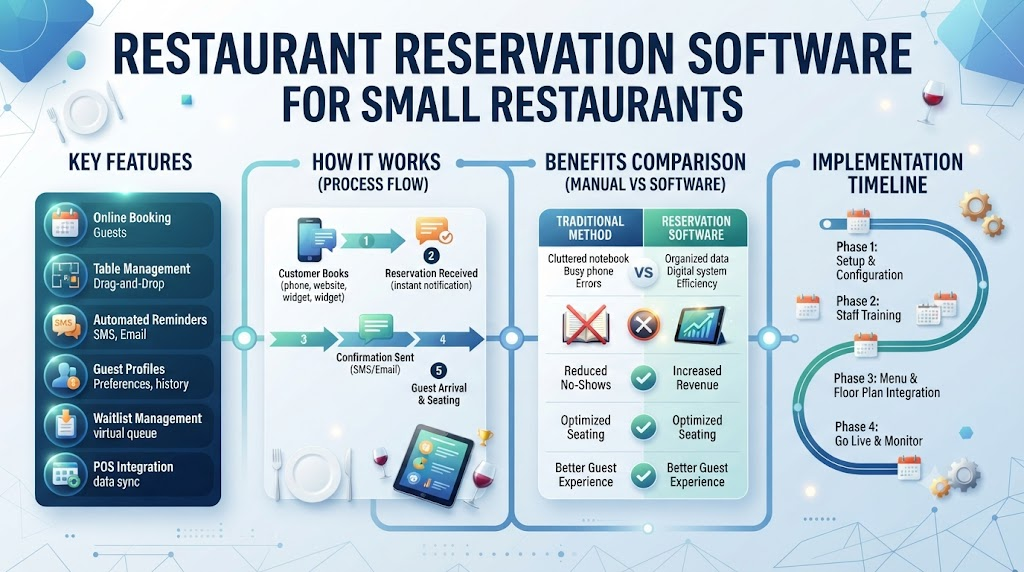
Restaurant Reservation Software for Small Restaurants
Independent bistros and neighborhood cafes have unique daily needs. Restaurant Reservation Software for Small Restaurants offers simple, compact tools. Small teams manage reservations without needing dedicated reception staff.
Affordable pricing fits modest restaurant budgets perfectly. Simple setups let owners launch online bookings in minutes. You do not need expensive hardware to run your dining room.
Compact software keeps small venues organized and profitable every day.
Free Restaurant Reservation System and Pilot Programs
New software investments require careful testing before final commitments. A Free Restaurant Reservation System lets owners try modern features safely. Zero-cost pilot programs give you access to digital floor plans.
You can test online reservations and waitlist tools without risk. Transparent terms help you evaluate software value before upgrading. Small venues can modernize operations without straining monthly cash flow.
Pilot programs prove the worth of digital tools instantly.
Multilingual Support and Modern Operations with DineGlobe
DineGlobe unites reservations, table layouts, and waitlists in one platform. Hospitality teams enjoy a seamless workflow from front door to kitchen. Multilingual interfaces support diverse international dining teams effortlessly.
Staff can switch between English, Japanese, and Arabic instantly. This flexibility helps global restaurants serve international travelers smoothly. DineGlobe empowers modern hospitality venues to deliver world-class service every single day.
Real-Life Dining Room Scenarios
- A busy downtown bistro seating walk-in couples at high-top tables while holding dining booths for reserved anniversary dinners.
- A neighborhood family restaurant joining two square tables into an eight-person banquet setting using visual floor-plan controls.
- An independent sushi bar using direct booking links to eliminate third-party per-cover commissions and track guest dietary preferences.
- A multi-language dining room team in an international hotel switching host stand screens between English, Japanese, and Arabic during shifts.
Common Mistakes to Avoid in Restaurant Table and Booking Management
- Taking reservations on paper slips that get misplaced during busy lunch services. Switching to digital logs stops lost bookings and angry guests.
- Overbooking peak dining hours without leaving physical seating buffers for delayed diners. Always add small time gaps between large party seatings.
- Relying entirely on third-party food portals and losing direct communication with loyal guests. Build your own booking page to keep direct connections.
- Forgetting to update table statuses when seated guests finish paying their bill. Train hosts to tap cleared tables immediately for faster turns.
- Turning away walk-in diners because the host team cannot see upcoming reservation gap times. Use live seating views to fit spontaneous guests safely.
- Guessing table wait times without checking real-time dining room turn averages. Rely on software data to give guests honest wait estimates.
- Failing to set up role-based logins, allowing accidental edits to shift policies. Lock manager settings so staff only access daily seating views.
- Locking small venues into rigid, high-fee reservation contracts before evaluating free pilot systems. Test flexible software options before committing long-term funds.
Simple Reservation Setup and Service Checklist
- Set up and customize direct online booking pages with clear opening hours.
- Build visual dining room floor plans with exact table numbers and chair counts.
- Establish default dining turn times based on party size.
- Train host teams on registering walk-ins and updating live table occupancy.
- Configure automatic confirmation messages and self-service reservation adjustment links.
Frequently Asked Questions
1. What is the difference between direct booking systems and third-party restaurant portals?
Direct booking systems connect diners straight to your restaurant website. You own all customer data and pay zero commissions per cover. Third-party portals list your venue alongside competitors and charge heavy fees for every reservation. Using direct tools builds customer loyalty and protects your operating margins.
2. How does online table management software stop double bookings during busy shifts?
Table management software updates live seating data across every host screen. When a guest books a table online, the system locks that slot instantly. Staff cannot accidentally assign two parties to the same table at the same time. This digital accuracy prevents front-door confusion during rush hours.
3. Can small independent cafes benefit from digital reservation platforms?
Small cafes often manage tight spaces and limited staff. Digital platforms let small teams handle bookings without answering phone calls constantly. Simple mobile setups keep tables organized and reduce administrative work. Compact venues gain professional efficiency without needing costly enterprise hardware.
4. How does restaurant floor plan software handle large party table combinations?
Floor plan software displays a visual bird’s-eye view of your dining room. Hosts can click and drag separate tables together on screen to form large groups. The system calculates total seating capacity instantly for the merged tables. This visual control ensures big parties fit comfortably without blocking service paths.
5. What is the best way to handle walk-in diners during fully booked evenings?
Smart restaurants reserve specific tables or time buffers for walk-in guests. Host stand software tracks live table turns to spot sudden openings. When a table clears early, hosts can seat waiting walk-ins immediately. Digital waitlists keep spontaneous diners informed and happy throughout the evening.
6. How does digital waitlist software estimate accurate return times for waiting guests?
Waitlist software analyzes past dining turn times and current kitchen pacing. The system calculates precise wait estimates based on real-time table statuses. Automated text messages update waiting guests if their table is ready early. Accurate estimates prevent guests from leaving out of frustration.
7. Can guests modify or cancel their reservations without calling the restaurant?
Digital booking systems include self-service links in every confirmation message. Diners can click the link to change party sizes or cancel plans. These updates sync immediately with the host stand display. Staff avoid endless phone interruptions while empty tables fill back up automatically.
8. What hardware or devices do host teams need to run modern host stand software?
Cloud-based host software runs smoothly on standard tablets and smartphones. Staff do not need bulky desktop computers at the reception desk. Portable tablets let hosts check in guests while walking the floor. Any internet-connected device gives your team instant access to shift details.
9. How do role-based staff permissions protect restaurant booking data?
Role-based logins give different access levels to hosts, servers, and managers. Front-line hosts can update table statuses and register walk-in guests. Only senior managers can change core shift rules, pricing, or cancellation policies. This security stops accidental mistakes and keeps operational data safe.
10. Why is multilingual platform support useful for modern hospitality teams?
International dining rooms often employ staff from diverse linguistic backgrounds. Multilingual software lets team members operate screens in their preferred language. Servers and hosts switch between English, Japanese, and Arabic with one tap. This clarity reduces training time and prevents costly service errors.
11. What features are included in a free restaurant reservation system pilot?
Free pilot programs give venues access to core digital reservation tools. Owners can test online booking pages, visual floor plans, and basic waitlists. Staff can evaluate software performance during live service shifts. Transparent pilot terms let venues experience modern tools before buying subscriptions.
12. How does DineGlobe combine table management, waitlists, and bookings in one tool?
DineGlobe brings online reservations, floor plans, and waitlists into a single dashboard. Front-of-house staff see advance bookings and live walk-ins on one screen. The platform automates table turns and syncs arrival updates instantly. This unified workflow helps hospitality teams deliver seamless service every shift.
Conclusion
Running a successful restaurant requires careful coordination across every shift. Modern digital tools take the guesswork out of front-of-house management. By combining direct booking pages, live floor plans, and smart waitlist features, your team can seat guests faster and reduce daily stress. Owning your guest data protects your profits while building lasting customer loyalty. Embrace reliable hospitality technology to streamline your service operations. Smooth table systems create memorable dining experiences that keep happy guests coming back for every meal.