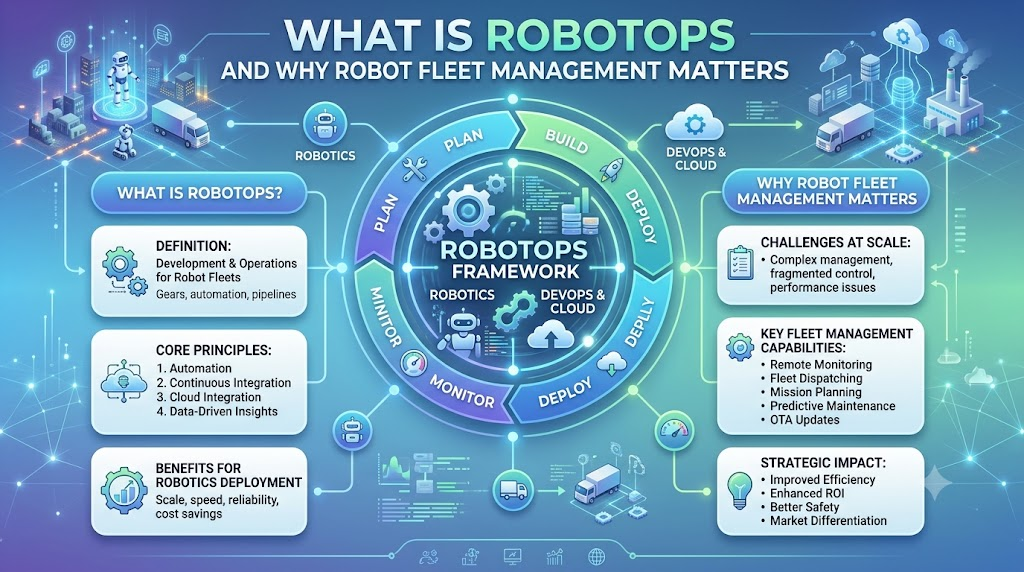
Imagine you manage 50 robots in a warehouse. Everything works well during the morning shift. Then, three robots lose their connection, one needs a software update, and another stops near a loading area. Your team needs to find the problem quickly. But how do you know which robot failed, what caused the issue, and whether you can fix it remotely? This is where RobotOps becomes useful. It brings software engineering, automation, monitoring, and lifecycle management practices into robotics operations. Instead of treating every robot as a separate machine, RobotOps helps teams manage robotic systems in a more organized way. Whether you work with industrial robots, autonomous mobile robots, or ROS 2-based systems, understanding RobotOps can help you build more reliable operational processes.
What Is RobotOps?
RobotOps is a set of practices used to develop, deploy, monitor, maintain, and manage robotic systems throughout their lifecycle.
It combines robotics software, DevOps, automation, observability, and operational processes to help teams run robots more effectively.
Think of RobotOps as the operational support system behind a group of robots. The robots perform physical tasks, while RobotOps helps your team manage their software, performance, updates, and problems.
For example, a factory may use robotic arms for assembly. Engineers need more than a working robot. They also need software updates, error monitoring, maintenance planning, and safety checks.
RobotOps connects these activities into a structured workflow.
It does not replace robotics engineering or physical safety systems. Instead, it supports the software and operational work needed to keep robotic systems running.
How Is RobotOps Different From Traditional Robotics?
Traditional robotics projects often focus on designing a robot, programming its movements, and testing its performance.
RobotOps adds attention to what happens after deployment.
You also need to consider:
- How will you monitor the robot?
- How will you deliver software updates?
- How will you investigate failures?
- How will you manage multiple robots?
- How will you track software and hardware changes?
A single robot may be manageable with manual processes. A large fleet can create much more operational work.
This is why RobotOps becomes increasingly relevant as robotics deployments grow.
Why RobotOps Matters for Robotics Operations
A robot can work correctly during testing and still experience problems in a real environment.
Its network connection may drop. A sensor may provide unexpected data. A software update may introduce a compatibility issue. A navigation system may struggle with a changed environment.
Without proper operational processes, engineers may spend considerable time identifying these problems.
RobotOps addresses several common challenges.
1. Robot Downtime
Robot downtime happens when a robot cannot perform its assigned work.
For example, an autonomous mobile robot might stop because of a battery issue or communication failure.
Monitoring and diagnostic tools can help teams identify problems earlier. However, monitoring alone cannot prevent every failure.
2. Failed Deployments
Robotics software often depends on hardware, sensors, middleware, and other components.
A change that works in simulation may behave differently on a physical robot.
RobotOps encourages testing, controlled deployments, and rollback planning where supported.
3. Manual Monitoring
Checking every robot individually takes time.
Centralized monitoring allows teams to view information from multiple robots through a shared system.
Imagine checking one dashboard instead of walking around a warehouse to inspect each robot.
4. Safety Risks
Robots operate around people, machines, and physical obstacles.
Software and operational mistakes can create safety concerns. RobotOps should therefore include safety checks, controlled deployment procedures, and clear incident response.
RobotOps supports safety management, but it does not replace certified safety systems, risk assessments, or required human oversight.
What Is Robot Fleet Management?
Robot Fleet Management is the process of coordinating, monitoring, maintaining, and managing multiple robots through shared operational systems.
A fleet can include warehouse robots, delivery robots, inspection robots, or industrial machines.
Instead of managing every robot separately, fleet management helps teams organize their work across the group.
How Does Robot Fleet Management Work?
Consider a warehouse with 30 autonomous mobile robots.
The robots may need to:
- Receive assigned tasks.
- Navigate warehouse routes.
- Report their operating status.
- Share information about battery levels.
- Receive software configuration updates.
- Report errors to an operations team.
A fleet management system can coordinate some of these activities, depending on its design and capabilities.
For example, it might assign a transport task to an available robot. Another component may monitor battery status and help determine when charging is needed.
The exact features vary between platforms. Some systems focus on task scheduling, while others also provide diagnostics, analytics, and software management.
Centralized vs. Decentralized Fleet Management
| Approach | How It Works | Example |
|---|---|---|
| Centralized | A shared system coordinates fleet-level tasks and information. | One platform manages assignments for warehouse robots. |
| Decentralized | Robots or local systems make more decisions independently. | Robots coordinate selected activities locally. |
Neither approach fits every situation.
Your choice depends on network reliability, robot capabilities, safety requirements, system architecture, and operational needs.
Key Concepts in RobotOps
RobotOps includes several technical concepts. Understanding them makes it easier to design and operate robotic systems.
1. Telemetry
Telemetry is the process of collecting and sending information about a system’s condition and activity.
A robot may send battery level, motor temperature, connection status, and sensor information.
For example, if several robots show unusually high motor temperatures, your team can investigate whether they share a mechanical or environmental issue.
Telemetry is useful only when teams collect relevant information and can interpret it correctly.
2. Observability
Observability helps engineers understand a system’s internal condition by examining its outputs, such as logs, metrics, and traces.
In robotics, this may include:
- Robot logs.
- Navigation errors.
- Sensor data quality indicators.
- Software process status.
- Communication failures.
Imagine a robot stops moving. Observability can help you investigate whether the cause involves navigation, communication, or a software process.
However, observability does not automatically identify every physical or software fault.
3. Robot Lifecycle Management
Robot lifecycle management covers the stages a robot passes through, from initial setup to retirement.
Common stages include:
- Configuration.
- Software installation.
- Testing.
- Deployment.
- Monitoring.
- Maintenance.
- Retirement.
A robot’s software and hardware may change throughout its operational life.
Maintaining records of versions, configurations, and maintenance activities helps teams manage these changes more consistently.
4. Predictive Maintenance
Predictive maintenance uses system data to estimate when maintenance may be needed.
For example, a team might analyze motor temperature, vibration, or operating hours to identify unusual patterns.
This approach can support maintenance planning, but predictions depend on data quality, suitable models, and appropriate validation.
Not every robotics system needs advanced predictive maintenance from the beginning.
5. Incident Management for Robots
Incident management is the process of identifying, responding to, documenting, and learning from operational problems.
Suppose a robot stops in a busy warehouse aisle.
Your team needs to understand the issue, assess safety, restore operations where appropriate, and record what happened.
A clear incident process helps reduce confusion during stressful situations.
Skills Needed for RobotOps
You do not need to master every robotics technology before starting. Build your skills gradually and focus on the systems you want to operate.
ROS 2
ROS 2 is a robotics software framework that provides tools and communication mechanisms for building robotic applications.
It is widely used in robotics development and supports communication between software components.
Learn basic concepts such as nodes, topics, services, and actions.
For example, a navigation node may publish information that another component uses to understand the robot’s position.
Robotics Middleware
Middleware is software that helps different components communicate and work together.
In robotics, middleware connects software processes, sensors, controllers, and other components.
Understanding communication patterns and system dependencies helps when diagnosing integration problems.
Simulation Tools
Robot simulation allows you to test robotic behavior in a virtual environment.
Simulation can help you experiment with navigation, sensors, and robot movement before using physical hardware.
It has limitations. A simulation may not reproduce every real-world condition, such as hardware wear, network interference, or unexpected obstacles.
Navigation and Perception
Navigation helps a robot determine how to move through an environment.
Perception involves using sensors and processing information about the surroundings.
You should understand basic concepts such as mapping, localization, obstacle detection, and sensor limitations.
DevOps and Automation
DevOps combines development and operations practices to improve how software is built, tested, and managed.
RobotOps can apply related practices to robotics software, including version control, automated testing, deployment processes, and monitoring.
Start with simple automation. For example, create a script that checks whether a robotics service is running correctly.
How to Start With RobotOps: A Step-by-Step Roadmap
If you are new to RobotOps, avoid trying to manage an entire robot fleet immediately.
Start with one robot or a simulated environment. Then expand your process.
Step 1: Understand Your Robotics System
Identify the robot’s main components.
Study its sensors, actuators, software, communication methods, and operating environment.
For a ROS 2 robot, learn how its nodes communicate and which components handle navigation or control.
Example: Before troubleshooting a navigation failure, understand which software component generates movement commands.
Step 2: Simulate Before Deploying
Use a simulation environment to test basic robot behavior.
Try simple tasks such as:
- Moving through a defined route.
- Detecting obstacles.
- Testing navigation behavior.
- Checking communication between nodes.
Simulation can help catch certain problems before physical deployment.
It cannot replace real-world testing, especially for safety-critical behavior.
Step 3: Add Basic Monitoring
Start collecting useful information from your robot.
Monitor connection status, software process health, battery information, and relevant error messages.
Avoid collecting large amounts of data without knowing how your team will use it.
Example: If a robot disconnects regularly, connection logs and timestamps can help identify patterns.
Step 4: Create a Deployment Process
Define how you will test and release software updates.
A basic process may include:
- Review the software change.
- Test it in simulation.
- Test it on a controlled robot.
- Verify essential functions.
- Deploy to a limited group.
- Monitor the results.
- Roll back when necessary and supported.
The exact process depends on your robot and operational requirements.
Step 5: Expand to Fleet Management
Once you understand individual robot operations, introduce fleet-level processes.
Consider task coordination, shared monitoring, software versions, maintenance schedules, and incident handling.
Start with a small group of robots before expanding the workflow.
Step 6: Review and Improve
After incidents or deployments, review what happened.
Ask:
- What failed?
- How did the team detect it?
- Was the response clear?
- What information was missing?
- Can testing or monitoring improve?
Continuous improvement is a central part of reliable operations.
Tools and Platforms for RobotOps
RobotOps uses different tools depending on the robotics environment.
There is no single tool that works best for every project. Your choice depends on the use case, budget, team skills, hardware, and system architecture.
Here are some common tool categories.
1. Simulation Tools
Simulation tools help you test robotic behavior in virtual environments.
Examples include:
- Gazebo.
- Webots.
- NVIDIA Isaac Sim.
Use them to explore navigation, robot interactions, and selected testing scenarios.
2. Middleware
Middleware supports communication between robotics software components.
Examples include:
- ROS 2.
- DDS-based communication systems used with ROS 2.
The right choice depends on your application and communication requirements.
3. Navigation
Navigation tools help robots plan movement and understand their position.
In ROS 2 environments, Nav2 is a common navigation framework.
Its suitability depends on the robot platform, sensors, environment, and required behavior.
4. Fleet Monitoring
Fleet monitoring platforms help teams track multiple robots and their operational information.
Features may include:
- Robot status dashboards.
- Error tracking.
- Task information.
- Connectivity monitoring.
- Operational reports.
Available features differ across products and deployments.
5. Telemetry and Observability
- Telemetry and observability tools collect and present operational data.
- Teams may use logging systems, metrics platforms, and custom monitoring applications.
- Choose tools that provide useful information without creating unnecessary complexity.
- For broader learning about RobotOps, you can explore educational material covering robotics operations, automation, and fleet-related concepts.
Best Practices for Managing Robot Fleets
Good fleet management requires more than installing a dashboard.
You need clear processes, useful data, and a plan for handling failures.
Centralized Monitoring
- Use a shared monitoring system where practical.
- Your team should be able to identify robot status, communication problems, and important errors without checking every machine manually.
- Centralization improves visibility, but it also creates dependencies. Plan for monitoring system failures and network limitations.
Remote Diagnostics
- Remote diagnostics can help engineers investigate certain problems without immediately visiting the robot.
- Useful information may include logs, software status, sensor readings, and connection history.
- Remote access should follow appropriate security and safety controls.
Scheduled Software Updates
- Plan software updates rather than changing production robots without a defined process.
- Use testing, version tracking, and staged deployment where possible.
- Not every robot supports the same update methods. Confirm that your process fits the actual hardware and software.
Safety Checks
- Include safety checks before and after changes.
- Review robot behavior, operating zones, emergency procedures, and relevant system safeguards.
- A software update should not be considered successful only because the application starts.
Incident Response Plans
- Prepare a response plan for common failures.
- Define who investigates the issue, who manages operational decisions, and how the team documents the event.
- For example, a warehouse may need a clear procedure for a robot that stops near a pedestrian area.
Common RobotOps Mistakes and How to Avoid Them
Even technically strong teams can face operational problems when processes remain informal.
Mistake 1: Skipping Simulation
Some teams move directly from development to physical testing.
How to avoid it: Use simulation where it fits, then validate behavior on real hardware before production deployment.
Mistake 2: No Centralized Monitoring
When each robot reports information differently, troubleshooting becomes harder.
How to avoid it: Define common monitoring requirements and create a shared view of essential robot information.
Mistake 3: Ignoring Software Update Cycles
Robotics software changes over time. Delaying all maintenance can create technical and operational challenges.
How to avoid it: Maintain a software inventory and establish a tested update process.
Mistake 4: Collecting Too Much Data
More telemetry does not always mean better decisions.
How to avoid it: Collect data that supports clear monitoring, troubleshooting, and maintenance goals.
Mistake 5: Treating Every Failure as a Software Problem
A robot can fail because of hardware, environment, connectivity, configuration, or software.
How to avoid it: Use a structured diagnostic process that considers the full system.
Real-World Example: A Warehouse Robot Loses Connection
Consider a warehouse using autonomous mobile robots to move materials.
During a busy shift, one robot loses communication with the fleet management system. It stops completing its assigned task.
An engineer receives an alert and checks the robot’s connection history.
The team discovers that the robot’s connection dropped repeatedly in a particular area. They investigate the network environment and inspect the robot’s configuration.
The issue may require network changes, configuration adjustments, or hardware investigation. The exact solution depends on the cause.
A RobotOps process helps organize the response:
- Detect the communication failure.
- Check the robot’s safety state.
- Review available logs and telemetry.
- Investigate the likely cause.
- Restore operations through an approved process.
- Record the incident.
- Test the corrective action.
This example shows why fleet management and incident handling work together.
A dashboard can show that something went wrong. A complete operational process helps the team decide what to investigate next.
How to Learn RobotOps Effectively
RobotOps combines several areas of technology. A structured learning approach can make the process easier.
Start With Robotics Fundamentals
- Learn basic concepts such as sensors, actuators, robot control, navigation, and communication.
- You do not need advanced knowledge of every robotics field at the start.
Practice With Simulation
- Choose a simulation project that lets you build and test a robot workflow.
- For example, create a simulated mobile robot and monitor its basic operating status.
- Hands-on practice helps you understand how individual components connect.
Learn ROS 2
- Study ROS 2 fundamentals before moving into advanced operational systems.
- Focus on nodes, topics, services, actions, launch files, and package management.
- Try simple projects where you can observe communication between components.
Develop Operational Skills
- Learn version control, testing, monitoring, and automation.
- Understand how software changes move from development into production.
- Resources from RobotsOps.com can serve as an additional learning reference as you explore RobotOps and related robotics operations topics.
When selecting tutorials, look for:
- Clear explanations of basic concepts.
- Hands-on labs.
- Simulation or real-robot projects.
- Practical troubleshooting examples.
- Information about system limitations.
- Updated technical guidance.
Avoid learning only through theory. Try building small systems and testing how they behave.
FAQs
1. What is RobotOps in simple terms?
RobotOps is the practice of managing robotic systems after and during development.
It includes software deployment, monitoring, maintenance, automation, and operational support.
2. Why is RobotOps important?
RobotOps helps teams organize the work required to operate robots reliably.
It supports monitoring, troubleshooting, software management, and incident response.
3. What is robot fleet management?
Robot fleet management involves coordinating and monitoring multiple robots through shared systems.
It can include task assignments, robot status, and operational information.
4. Is RobotOps the same as DevOps?
RobotOps applies several DevOps ideas to robotic systems.
However, robotics also involves physical hardware, sensors, movement, and safety requirements.
5. How does ROS 2 support RobotOps?
ROS 2 provides communication and software tools for robotics applications.
Understanding ROS 2 helps engineers manage dependencies, troubleshoot components, and operate robotics software.
6. Can beginners learn RobotOps?
Yes. Beginners can start with robotics fundamentals, ROS 2, simulation, and basic monitoring.
A small simulated project can provide useful hands-on experience.
7. Why is simulation useful in robotics?
Simulation lets you test selected robot behaviors in a virtual environment.
It can reduce some development risks, but it cannot reproduce every real-world condition.
8. What is telemetry in robotics?
Telemetry is data collected from a robot about its activity or condition.
Examples include battery information, error messages, and connection status.
9. Does RobotOps prevent all robot failures?
No. RobotOps cannot eliminate every hardware, software, environmental, or operational problem.
It helps teams prepare for failures and respond through structured processes.
10. What skills are useful for a RobotOps engineer?
Useful skills include robotics software, ROS 2, simulation, monitoring, automation, and troubleshooting.
Knowledge of safety practices and system integration is also valuable.
Conclusion
RobotOps brings software engineering, monitoring, automation, and lifecycle management into robotics operations. Robot fleet management helps teams coordinate multiple robots, while telemetry, observability, and incident response support daily operations. Start with robotics fundamentals, practice in simulation, and gradually build monitoring and deployment processes. To continue learning, explore the educational resources at RobotsOps.com and develop your understanding of modern robotics operations.