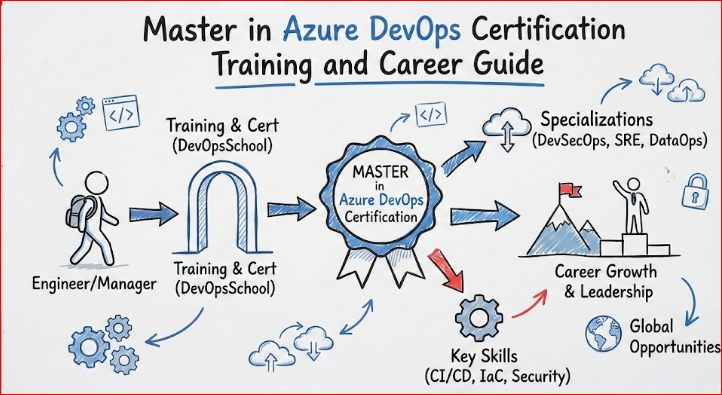
Introduction
The software development landscape has undergone a tectonic shift over the last decade. I have witnessed the industry move from the days of manual server racking and “siloed” departments to a world where speed and stability must coexist. In this modern era, Master in Azure DevOps has emerged as much more than a simple suite of tools; it is the definitive backbone of engineering excellence. Whether you are an engineer in a fast-paced startup in Bangalore or a manager overseeing a global team from London, the pressure to deliver high-quality software faster than ever is a shared reality. To truly master this environment, you need to look beyond the surface level of basic task management and automated builds. True mastery means understanding how to weave security, reliability, and financial accountability into every line of code and every deployment pipeline. This guide is designed for the working professional who is ready to move past the “basics” and adopt the mindset of a domain expert. We will explore how a unified platform like Azure DevOps can bridge the gap between business ideas and technical execution, providing a stable, scalable, and secure path for the modern software lifecycle.
Deep Dive: Master in Azure DevOps Certification
What it is
This is an intensive, end-to-end program that covers the entire software development lifecycle (SDLC) through the lens of Azure. It moves past simple button-clicking and teaches you how to design robust, scalable automation systems. You will learn to integrate code management, continuous integration, continuous delivery, and advanced monitoring into a single, cohesive workflow.
Who should take it
- Software Engineers: Those tired of manual deployments and looking to automate their own workflows.
- Managers & Leads: Individuals who need to oversee technical teams and ensure that the DevOps culture is being implemented correctly across the organization.
- System Administrators: Professionals transitioning from traditional “Ops” to modern “Cloud Ops” roles.
- Freshers with Ambition: Beginners who want to skip the trial-and-error phase and start their careers with high-demand skills.
Skills you’ll gain
- Strategic Planning: Mastering Azure Boards to manage backlogs, sprints, and team velocity with high precision.
- Advanced Version Control: Managing complex branching strategies (Gitflow, Trunk-based) within Azure Repos.
- Pipeline Orchestration: Building complex, multi-stage YAML pipelines that can handle everything from unit tests to production deployments.
- Infrastructure as Code (IaC): Using tools like Terraform and Bicep to treat your infrastructure exactly like your application code.
- Automated Security: Implementing “Shift Left” security by adding automated vulnerability and credential scanning into every build.
- Container Mastery: Orchestrating deployments using Azure Kubernetes Service (AKS) and Azure Container Registry (ACR).
Real-world projects you should be able to do after it
- The Global Enterprise Pipeline: Create a pipeline that deploys a microservices-based application to multiple Azure regions (e.g., Central India, East US, and West Europe) simultaneously.
- Self-Service Infrastructure: Build a system where developers can request a new environment (Dev/Test) via a pull request, which is then automatically provisioned and secured.
- The “Zero-Trust” Pipeline: A security-first workflow where every piece of code is checked for compliance, secrets, and vulnerabilities before it ever touches a server.
- Data-Driven Monitoring: Setting up advanced dashboards that track not just “Is the server up?” but “Is the user experience fast and error-free?” using Application Insights.
Preparation plan
- 7–14 Days (The Fast Track): This is for those already working in Azure. Focus 100% on the latest YAML schema for pipelines and the integration points between Azure DevOps and GitHub. Review the nuances of Azure Artifacts and release gates.
- 30 Days (The Standard Path): Dedicate 2 hours a day. Weeks 1-2 should be spent on the “Core Five”: Boards, Repos, Pipelines, Test Plans, and Artifacts. Weeks 3-4 should focus on hands-on labs involving Docker and Kubernetes integration.
- 60 Days (The Foundation Path): Spend the first month learning the “Azure Way”—understanding identity (Entra ID), networking, and storage. Spend the second month exclusively on the DevOpsSchool curriculum, building and breaking pipelines until you understand the error logs perfectly.
Common mistakes
1. The “Click-Ops” Trap
Many engineers start by using the Classic Visual Editor in Azure Pipelines because it’s easy and intuitive. However, relying on the GUI means your pipeline configuration isn’t version-controlled. If someone changes a setting, there is no audit trail.
- The Fix: Use YAML-based pipelines exclusively. This allows your “Pipeline as Code” to live alongside your application code, enabling peer reviews and easy rollbacks.
2. Treating Security as a “Final Step”
I often see teams build a perfect deployment pipeline, only to have the security team block it at the very end. This “Waterfall-style” security creates massive bottlenecks and frustration.
- The Fix: Implement “Shift Left” security. Integrate tools like SonarQube, WhiteSource, or Azure’s native security scanning directly into the CI build. If a vulnerability is found, the build should fail immediately, long before it reaches production.
3. Neglecting “Clean” Pipeline Logic
When pipelines grow complex, engineers often resort to massive, monolithic YAML files or hard-coded scripts that are impossible to maintain. This results in “Spaghetti Pipelines” where a small change in one place breaks the entire flow.
- The Fix: Use Templates and Task Groups. Break your logic into reusable modules for building, testing, and deploying. This makes your pipelines scalable and much easier for other team members to understand.
4. Hardcoding Secrets and Variables
This is a high-stakes mistake. I have seen API keys, database passwords, and service principal secrets accidentally committed to Azure Repos or written plainly in pipeline variables. This is a massive security risk that can lead to data breaches.
- The Fix: Leverage Azure Key Vault. Store your sensitive data there and use the Key Vault task in Azure DevOps to pull those secrets securely at runtime. Never, ever store a password in plain text.
5. Overlooking the “Ops” in DevOps
It’s easy to focus solely on the “Dev” side—getting code out the door. But if you aren’t automating the monitoring and feedback loops, you are only doing half the job. Deploying bad code faster isn’t the goal.
- The Fix: Automate your Azure Monitor and Application Insights setup within your release pipelines. Set up “Release Gates” that automatically roll back a deployment if error rates spike or performance degrades after a release.
6. Ignoring Work Item Discipline
Azure Boards is incredibly powerful, but it only works if the data is accurate. If developers are committing code without linking it to a Work Item (Bug, Task, or User Story), managers lose all visibility into what is actually being delivered.
- The Fix: Enforce a policy in Azure Repos that requires a Work Item to be linked to every Pull Request. This creates a clear “Traceability Matrix” from a business requirement all the way to the production code.
Best next certification after this
1. Same Track (Deepening Platform Expertise)
If you want to become the undisputed “Azure Guru” in your organization, stay within the ecosystem. Focus on the Azure Security Engineer Associate or the Azure Solutions Architect Expert. These certifications validate that you don’t just know the “DevOps” tools, but you also understand the underlying infrastructure, identity management, and networking at a granular level. This is the path for those who want to be high-level architects.
2. Cross-Track (Broadening Professional Scope)
If you are interested in how systems behave after they are deployed, move into Site Reliability Engineering (SRE). While DevOps focuses on the “flow” of delivery, SRE focuses on the “stability” of the service. Taking an SRE certification teaches you about error budgets, toil reduction, and incident management—skills that turn a good engineer into a world-class operator. It is the perfect bridge for those who want to manage large-scale, high-availability systems.
3. Leadership (Scaling Your Impact)
For those who have 10-15 years of experience and are looking to move into Director or VP roles, the technical certifications should be paired with Agile Leadership or DevOps Management programs. These tracks focus on the “human” side of the equation—hiring strategies, budgeting for cloud resources, and driving the cultural change necessary to make DevOps successful across an entire company. It’s about moving from “doing” the work to “leading” the people who do it.
Azure DevOps Certification Landscape
| Track | Level | Who it’s for | Prerequisites | Skills Covered | Recommended Order |
| Master in Azure DevOps | Expert | Engineers & Managers | Basic IT Knowledge | End-to-End DevOps, CI/CD, IaC | 1 |
| Azure Administrator | Associate | IT Professionals | Azure Basics | Identity, Governance, Compute | 2 |
| Azure Developer | Associate | Developers | Coding Skills | SDKs, Cloud Dev, Storage | 3 |
| Azure Solutions Architect | Expert | Architects | Design Experience | Infrastructure, Security, Continuity | 4 |
Choose Your Path: 6 Specialized Learning Paths
Becoming a “Master” is the starting line. From there, you should choose a niche that matches your passion and the needs of your organization:
1. The DevOps Path (The Architect)
This path is about the “Big Picture.” You focus on how code flows through the entire company. You will master release strategies like Blue/Green and Canary deployments. Your goal is to make sure that “Friday Afternoon Deployments” are boring because they are so reliable.
2. The DevSecOps Path (The Protector)
Security is no longer a “final check.” In this path, you learn to weave security into the very fabric of the pipeline. You will master static and dynamic analysis tools (SAST/DAST) and ensure that no insecure code ever reaches production. This is highly valued in the banking and healthcare sectors.
3. The SRE Path (The Stabilizer)
Site Reliability Engineering is about applying software engineering principles to operations. You will use Azure DevOps to manage “Error Budgets” and “SLOs.” If a system fails, you don’t just fix it—you write code to make sure it can never fail that way again.
4. The AIOps/MLOps Path (The Future)
Machine Learning models need to be updated just like code. This path teaches you how to automate the training, testing, and deployment of AI models. You will bridge the gap between Data Scientists and Operations teams using Azure Machine Learning integrations.
5. The DataOps Path (The Analyst)
Data is useless if it’s stuck in a silo. DataOps is about automating the data pipeline. You will use Azure DevOps to manage Data Factory workflows and SQL deployments, ensuring that the business always has access to fresh, clean, and accurate data.
6. The FinOps Path (The Optimizer)
Cloud costs can destroy a budget. In the FinOps path, you use Azure DevOps to automate cost-saving measures. You’ll build scripts that identify underused resources and automatically scale down environments after work hours, saving the company thousands of dollars.
Role → Recommended Certifications
If you are looking to advance in your current role or pivot to a new one, follow these suggested combinations:
| Role | Primary Recommended Certification | Secondary / Specialization Certification |
| DevOps Engineer | Master in Azure DevOps | Certified DevSecOps Professional |
| SRE (Site Reliability Engineer) | Master in Azure DevOps | Site Reliability Engineering (SRE) Training |
| Platform Engineer | Master in Azure DevOps | Kubernetes Mastery / IaC Specialist |
| Cloud Engineer | Azure Administrator (Associate) | Master in Azure DevOps |
| Security Engineer | Master in Azure DevOps | Certified DevSecOps Professional |
| Data Engineer | Master in Azure DevOps | DataOps Certification |
| FinOps Practitioner | Master in Azure DevOps | Cloud Financial Management |
| Engineering Manager | Master in Azure DevOps | Agile Leadership / DevOps Leadership |
Next Certifications to Take
After achieving your Master in Azure DevOps status, here are three ways to continue your growth:
- Same Track (Specialization): Stay within the Azure ecosystem and go for the Azure Security Engineer or Azure Network Engineer. This makes you the “go-to” person for deep technical issues on the platform.
- Cross-Track (Broadening): Look into Site Reliability Engineering (SRE). This expands your mindset from “How do I build it?” to “How do I keep it running perfectly at a massive scale?”
- Leadership (Growth): Pursue Agile Leadership or DevOps Management certifications. These focus on the soft skills—hiring, budgeting, and cultural transformation—that are required for Director or VP levels.
Top Institutions for Master in Azure DevOps Training
Choosing the right partner for your learning is just as important as the certification itself. Here are the leaders in the space:
- DevOpsSchool: This is the gold standard for Azure DevOps training. They offer a deeply practical, lab-intensive curriculum that mirrors real-world enterprise environments. Their trainers are working professionals who bring actual “war stories” to the classroom, ensuring you learn not just the “how” but the “why” of every tool.
- Cotocus: This institution excels at corporate training and high-level consulting. They focus on helping large teams transition to Azure DevOps by providing tailored workshops that address specific organizational challenges. Their approach is very hands-on and focuses on solving immediate business problems.
- Scmgalaxy: One of the oldest and most respected names in the DevOps community. They provide a massive library of resources, tutorials, and deep-dive training on Source Code Management. They are the best choice if you want to become an absolute expert in Git, branching, and build automation.
- BestDevOps: This school is dedicated to career transformations. They specialize in taking professionals from traditional IT roles and providing them with a structured, step-by-step roadmap to becoming a senior-level DevOps Engineer using the Azure platform.
- DevSecOpsSchool: The premier choice for security-conscious engineers. They provide the specialized training needed to integrate security into every phase of the Azure DevOps lifecycle. If you want to be the “Security Champion” of your team, this is where you go.
- Sreschool: As organizations grow, reliability becomes their biggest challenge. Sreschool provides the bridge between standard DevOps and high-level Site Reliability Engineering. They focus on monitoring, incident response, and the automation of system health.
- Aiopsschool: For those looking at the next decade of tech, Aiopsschool teaches you how to use AI to manage complex Azure environments. They focus on using machine learning to predict failures before they happen and automate routine operational tasks.
- Dataopsschool: Modern business is data-driven, and this school teaches you how to apply DevOps principles to the world of Big Data and Analytics. They focus on automating the data supply chain using Azure’s robust data toolset.
- Finopsschool: With cloud costs rising, FinOps has become a critical discipline. This school teaches you how to use automation within Azure DevOps to monitor spending, optimize resource usage, and ensure that every dollar spent on the cloud provides maximum value.
FAQs: General Azure DevOps Mastery
1. Is Azure DevOps harder to learn than AWS?
Not necessarily. It is just different. If your company already uses Microsoft tools (like Outlook, Teams, or Windows), Azure DevOps will feel very natural. The integration is seamless.
2. How much coding do I actually need to know?
You don’t need to be a professional coder, but you must be comfortable with logic. You will write YAML for your pipelines and likely some PowerShell or Bash scripts for automation tasks.
3. What is the average salary hike after getting this certification?
While it varies by region, professionals with a “Master” level certification in Azure DevOps often see salary increases ranging from 30% to 50% as they move into senior roles.
4. Can I learn Azure DevOps if I don’t have a computer science degree?
Yes. I have seen many successful engineers come from diverse backgrounds. What matters is your ability to solve problems and your willingness to keep learning.
5. How relevant is this certification for the Indian market?
Extremely. India is a hub for global service companies that manage Azure environments for the world’s biggest brands. This certification makes you a top-tier candidate for these firms.
6. Do I need to pay for an Azure account to learn?
Microsoft offers a “Free Tier” with $200 in credits. Most training providers like DevOpsSchool will guide you on how to use this free tier to complete all your labs without spending extra money.
7. Is the certification exam online?
Yes, almost all modern certifications, including the Master program, offer online proctored exams that you can take from the comfort of your home or office.
8. What is the difference between DevOps and SRE?
DevOps is a philosophy focused on breaking down silos and automating delivery. SRE is a specific implementation of that philosophy that focuses on making sure the system stays up and running efficiently.
9. Will Azure DevOps be replaced by GitHub Actions?
They are actually moving closer together. Most of what you learn in Azure DevOps applies directly to GitHub Actions. Learning one makes you much faster at learning the other.
10. How do I handle “Legacy” applications in Azure DevOps?
That is part of the Master program. You learn how to take old applications and “wrap” them in modern pipelines so they can still benefit from automation.
11. Is this certification recognized by HR departments?
Yes, “Master” level certifications are often used as filters by HR and recruiters to find candidates who have gone beyond the basic “Associate” level.
12. How often are the course materials updated?
Cloud tech moves fast. Top institutions like DevOpsSchool update their curriculum several times a year to reflect the latest changes in the Azure portal and pipeline features.
FAQs: Master in Azure DevOps (Specific)
1. Does the program cover Infrastructure as Code (IaC)?
Yes, it is a core module. You will learn to use Terraform and Azure Bicep to manage your infrastructure through the DevOps pipeline.
2. Will I learn about Kubernetes?
Absolutely. Managing Azure Kubernetes Service (AKS) through Azure DevOps pipelines is one of the most important skills you will gain.
3. Is there a community for students?
Yes, most training providers offer access to private forums or Slack/Discord groups where you can network with other professionals and get help with technical issues.
4. Can this certification help me move into a Management role?
Yes, because it gives you the technical authority to lead teams. Managers who understand the “how” of DevOps are much more effective than those who only understand the “what.”
5. Are the projects reviewed by real instructors?
In the Master program at DevOpsSchool, your projects are typically reviewed by mentors to ensure you are following industry best practices.
6. What happens if I miss a live class?
Most providers offer recorded sessions, so you can catch up on your own time if your work schedule gets in the way.
7. Do I get a physical certificate?
You typically receive a high-quality digital certificate and a badge that you can add to your LinkedIn profile to showcase your expertise.
8. How long is the certification valid?
It is generally recommended to refresh your knowledge every two years, given how quickly cloud features evolve.
Testimonials
“I spent years doing things the ‘old way.’ This program opened my eyes to what is possible when you truly master automation. I’ve now automated our entire deployment process, and I finally have my weekends back.”
— Karan S., Lead Engineer
“The ROI on this certification was immediate. Within three months of finishing the Master in Azure DevOps, I was promoted to a DevOps Architect role with a significant salary bump. The practical labs were the key.”
— Anjali D., DevOps Architect
Conclusion
The transition to Azure DevOps is a journey that blends technical prowess with a deep-seated cultural shift toward efficiency and transparency. After decades in the industry, I have seen that the professionals who truly thrive are those who stop viewing automation as a luxury and start treating it as a foundational requirement. This guide serves as your roadmap, but the real mastery is forged in the trenches—by building, breaking, and refining pipelines every single day. By pursuing the Master in Azure DevOps certification, you aren’t simply adding a credential to your LinkedIn profile; you are acquiring a robust toolkit and a mindset that will serve you throughout your entire career. Whether you are leading a team in Bangalore or architecting systems for a global enterprise in New York, the core principles remain the same: automate the repetitive, secure the critical, and never stop delivering value. The path to mastery is open—take that first step today and be the engineer who leads the next wave of innovation.